Updated
Open the editor
Choose Edit in a template preview, open a saved design in Library, or use Library's create control to start a blank widget and choose a canvas size.
Narrow windows stack the canvas and editing area; wider windows can place them side by side. These layouts use the same complete editor.
Select a layer
- Tap text or an image on the canvas to select its layer.
- Use the layer list when overlapping objects are hard to select.
- Expand a container to see its children. Selecting a child on the canvas reveals its location in the list.
- Confirm the selection before opening its content, layout, appearance or interaction controls.
A container groups layers. Changing its spacing, clipping or opacity can affect several children.
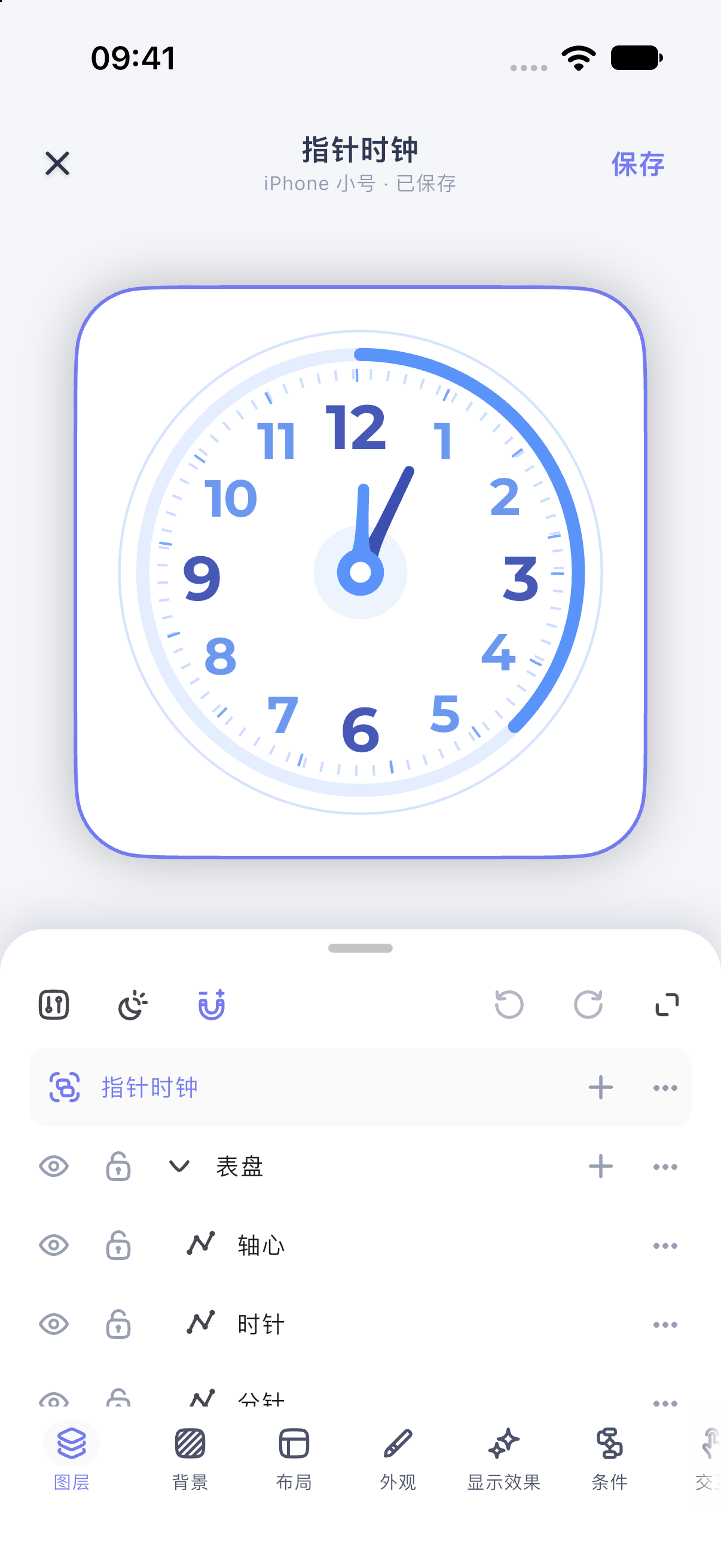
iPhone 17 simulator · iOS 27.0 · MuseScreen 2.2.0 (1). The screenshot shows the Simplified Chinese interface.
Make a small change
Select a text layer, change its color, then undo to compare. Save when you are happy. Guides, grids and selection outlines are editing aids, not design content.
Check whether Common, Light or Dark is selected in the top toolbar before changing appearance properties.
Continue learning
Templates may contain bindings and conditions. Changing a style does not require replacing dynamic content with fixed text.